




Summary

Integrations
Appointment injection channel
It is now possible to specify the appointment injection channel via the API.
Use the “createdFrom” field.
Do not send emails about injected appointments
In the account settings, you can define an injection channel that prevents emails from being sent to visitors regarding appointments. This allows, for example, Orion to avoid sending an email if your tool has already sent one.
Agenda
Multi-mode appointment slots
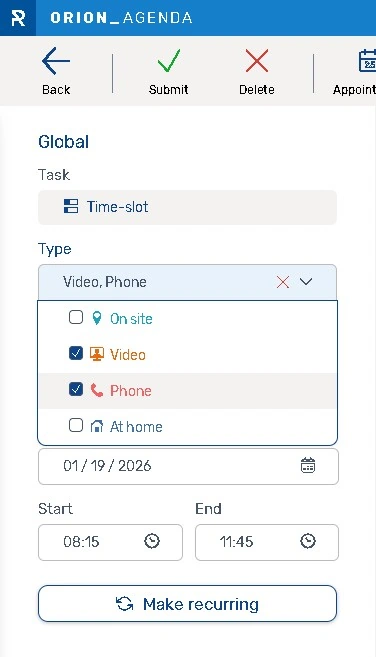
You can select multiple reception modes for a slot in the agenda, including: on site, video, telephone, at home.
The slot colors will vary depending on the combined modes, and icons for the selected modes will be displayed on the slots.
At home appointment
“At home” is now a fully-fledged reception mode.
Confirmation emails sent for this mode no longer contain the QR code, the login button, or the location address.
The icon is that of the “At home” mode.
In the APIs, it is possible to specify or receive the “ATHOME” mode.
Status change limitations
To ensure more accurate statistics, certain status changes from Agenda are blocked, specifically the statuses for current and future appointments.
- If the interview is in progress, its status cannot be changed.
- If the interview is completed, its status cannot be modified.
- If the appointment has not yet been processed (past or future), it can be modified with the following statuses: Confirmed, To Prepare, Not kept by visitor, Not kept by organization, Pre-processed.
- If a past appointment is created, the following statuses can be assigned: Received on time, Received very early, Received late because of the visitor, Received late because of the organization, Not kept by visitor, Not kept by organization.
- If a future appointment is created, the following statuses can be assigned: Confirmed, To Prepare.
Make an appointment via the agenda
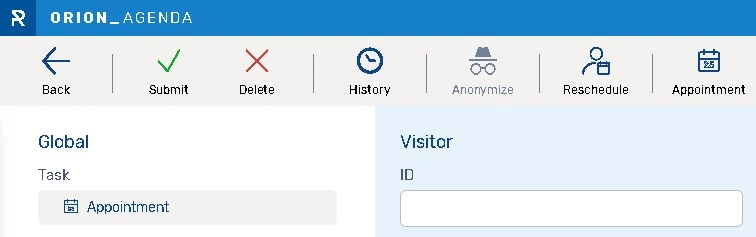
To make scheduling a new appointment easier, a new button allows you to reschedule an appointment with a visitor from the appointment editing window.
Filters in CSV export of visits
Filters are taken into account in the CSV export of visits.
Other new features
Orion Survey
If the visitor has already completed the survey received by email and clicks the link again, a message will appear saying “You have already completed the survey, thank you.” If they did not complete the entire survey, they will resume it where they left off.
Bug fixes and performances improvements
Agenda
- Ability to modify events via the list on accounts with more than 200 sites.
- Requires the “Manager” role to export appointments and events.
Administration
- Pagination beyond 500 items in the module lists.
- Optimized workstations list load request.
- The hyphen (-) is allowed in the location and location group code.
Kiosk
- Display of the print button for an information request, even when a disability is indicated.
Digital ticket
- Display of the call page on smartphones when the appointment is called.
- Display of the call page on smartphones when the digital ticket is called.
Appointment making
- Once the time slot is selected, the location remains unchanged, even with load balancing.
Analytics
- Correct calculation in case of deleted resources.
- The “mobile-null” channel no longer appears.
Configuration
- Do not offer SMS options if the function is disabled at the account level.
- Case-insensitive for location group codes.